
OpenAI Dots vs Meta Muse
Which always-on AI agent is better for you?
Last updated: September 30, 2026
Meta Muse and OpenAI Dots are two of the clearest examples yet of where AI assistants are heading next. Instead of waiting for you to type a new prompt every time, both are designed to act more like persistent AI agents: they can keep track of goals, work across multiple steps, use a browser or computer, connect to other apps, and come back to you with updates when something needs your attention.
On the surface, they look extremely similar. The real differences are less about whether one can "browse the web" or "complete tasks," and more about where each agent lives, what ecosystem it connects to, how much it costs to access, and the kinds of workflows it fits most naturally.
This guide breaks down OpenAI Dots vs Meta Muse based on their current published features, pricing, availability, and intended use cases.
Quick Answer
If you already use ChatGPT heavily for research, coding, documents, business workflows, or connected apps, Dots is the more natural extension of that environment.
If you want a lower-cost personal AI agent that is tightly connected to your everyday life, WhatsApp, Meta services, shopping, reminders, goals, and personal tasks, Muse has the easier entry point.
Both can handle many of the same tasks. The choice mainly comes down to ecosystem, pricing, and how you want to interact with your agent.
OpenAI Dots vs Meta Muse at a Glance
| Feature | OpenAI Dots | Meta Muse |
|---|---|---|
| Main idea | Always-on AI agent inside ChatGPT | Personal always-on AI agent from Meta |
| Core model | GPT-6 Astra | Muse Spark |
| Entry price | Requires an eligible ChatGPT Pro, Business Premium, or Enterprise plan | Free limited tier available |
| Paid consumer pricing | Eligible ChatGPT Pro plans currently start at $100/month | Power: $20/month; Maximum: $100/month |
| Cloud computer | Yes | Yes |
| Browser access | Yes | Yes |
| Keeps working between conversations | Yes | Yes |
| Proactive updates | Yes | Yes |
| Connected apps | Yes | Yes |
| Local computer access | Supported through ChatGPT desktop | Mac computer access supported |
| Messaging access | ChatGPT, Slack, and Teams, plus voice calls | Muse app, WhatsApp, web, and Mac |
| Purchases / external actions | Supported with approvals where required | Supported with approvals where required |
| Recurring tasks | Yes | Yes |
| Best fit | Existing ChatGPT power users, creators, professionals, developers, teams | Personal productivity, everyday tasks, Meta/WhatsApp users, shopping and life admin |
Availability, limits, and plan entitlements are still changing as both products roll out.
What Is OpenAI Dots?
OpenAI Dots are persistent AI agents built directly into ChatGPT. A Dot is different from a normal ChatGPT conversation because you can give it an ongoing responsibility instead of repeatedly starting from scratch.
For example, you could ask your Dot to:
- Monitor a topic and send you important updates
- Research competitors every week
- Keep track of an ongoing project
- Work across connected apps
- Prepare documents or reports
- Coordinate work with ChatGPT Work or Codex
- Use a cloud computer to complete multi-step tasks
- Continue working between conversations
- Come back to you when it needs a decision or approval
Dots are powered by GPT-6 Astra and have their own cloud computer. OpenAI also says a Dot can work across connected tools and delegate certain work to other agent systems such as Work or Codex.
The important idea is continuity. Instead of thinking of ChatGPT as a chatbot that waits for the next prompt, a Dot can be given an ongoing role.
What Is Meta Muse?
Meta Muse is Meta's personal AI agent. Like Dots, Muse is designed to keep working after you stop actively talking to it. Muse has its own persistent virtual computer and browser, can connect to external apps, and can complete multi-step tasks on your behalf.
Meta positions Muse heavily around both personal productivity and everyday life. Example use cases include:
- Booking reservations
- Planning trips
- Shopping
- Tracking prices
- Managing reminders
- Organizing calendars
- Completing forms
- Creating documents
- Monitoring goals
- Handling customer-service tasks
- Researching purchases
- Working with connected business apps
Muse can also proactively suggest actions and return with updates instead of waiting for you to send another message.
One of its biggest differences is how you interact with it. Muse can be accessed through Meta's Muse experience and WhatsApp, making it feel more like messaging a personal assistant than opening a traditional AI workspace.
The Biggest Similarity: They Can Do Many of the Same Things
This is the most important point in the comparison. Dots and Muse overlap heavily. Both can:
- Browse the web
- Use their own remote computer
- Work across multiple steps
- Connect to external apps
- Remember ongoing context
- Continue working between conversations
- Handle recurring tasks or goals
- Proactively send updates
- Ask for approval before sensitive actions
- Create documents or other outputs
- Carry out real actions instead of only answering questions
That means there is no simple divide where one is "for work" and the other is "for personal life." Both can potentially do both. The more useful question is: which ecosystem do you want your AI agent to live inside?
OpenAI Dots Features
1. Powered by GPT-6 Astra
OpenAI says Dots are powered by GPT-6 Astra, its model designed for long-running and agentic work. That gives Dots access to OpenAI's latest reasoning and computer-use capabilities.
2. Its Own Cloud Computer
Each Dot can use its own cloud computer and browser, allowing it to complete tasks that require interacting with websites, files, software, or online services instead of simply producing text.
3. Persistent Work
Dots are designed to keep track of goals and continue making progress between conversations — one of the biggest differences between a Dot and a standard ChatGPT chat.
4. Connected Apps
Dots can work with apps and services you connect to ChatGPT. This matters most for people whose work already happens across tools such as email, documents, project-management systems, messaging platforms, or business software.
5. ChatGPT Work and Codex
Dots can hand off deeper work to other OpenAI agent systems. For example, a Dot could coordinate a research task, have Work produce a finished deliverable, or delegate coding work to Codex.
6. Proactive Updates
Your Dot does not always need to wait for you to message first. It can monitor information, work toward ongoing goals, and return when there's something you need to review or decide.
7. Local Computer Access
With permission, Dots can also work with your local computer through the ChatGPT desktop experience, expanding the kinds of tasks they can handle beyond cloud-only workflows.
Meta Muse Features
1. Persistent Personal AI Agent
Muse is built around having a personal agent that gets to know your goals and helps manage them over time. It can build plans, track progress, and proactively suggest actions.
2. Secure Virtual Computer and Browser
Muse uses a persistent virtual computer with a browser, allowing it to interact with websites directly and complete multi-step tasks.
3. WhatsApp Integration
One of Muse's most distinctive features is that you can interact with it through WhatsApp. For people who already spend most of their day messaging, this can make the agent feel much more natural and accessible.
4. Shopping and Purchases
Meta is pushing Muse heavily into shopping-related workflows. Muse can research products, compare prices, track price drops, help with purchases, and assist with returns and refunds. Purchases still require user approval where appropriate.
5. Goals, Reminders, and Monitoring
Muse can monitor things you care about, track goals, create reminders, and come back to you with updates — useful as an ongoing personal assistant rather than only an on-demand chatbot.
6. Connected Apps
Muse supports connectors to external apps and services. Meta has also expanded Muse toward small-business workflows with integrations across tools such as Slack, Shopify, Notion, QuickBooks, Canva, Figma, Stripe, Zoom, and Meta's own business platforms.
7. Mac Computer Access
Muse can work with a user's Mac with permission, giving it access to desktop files, apps, browser tabs, and other local workflows.
Pricing: Dots vs Muse
Pricing is currently one of the clearest differences between the two.
OpenAI Dots Pricing
Dots are currently rolling out across ChatGPT Pro, Business Premium, and Enterprise plans in eligible markets (Pro is not available in the EEA, Switzerland, or the UK at launch). The first personal Dot is included with eligible plans rather than sold as a separate add-on.
OpenAI has also offered expanded usage during the launch period, though exact long-term usage rules for deeper Dot work are still being finalized. For most consumers: you currently need a relatively expensive ChatGPT subscription to access Dots.
Meta Muse Pricing
Muse has a much lower barrier to entry, though availability is currently limited (Meta lists the US and Canada, and not every feature is available in every location).
Those "Muse tokens" shouldn't be interpreted as directly equivalent to standard API tokens or a guaranteed number of completed tasks. Still, the pricing structure makes Muse significantly easier to try.
Which Is Cheaper?
For someone who doesn't already pay for ChatGPT Pro, Muse has the obvious advantage in entry price — you can try it for free, and its first major paid tier is currently $20/month. Dots currently require an eligible ChatGPT Pro, Business Premium, or Enterprise plan, with consumer Pro access starting much higher.
However, if you already pay for ChatGPT Pro for other reasons, the effective extra cost of trying Dots may be zero. That makes the comparison different for existing ChatGPT power users.
Dots vs Muse for Travel Planning
Travel is a good example of how similar these products are. You could potentially give either agent a broad goal such as:
"Plan my five-day trip to Tokyo. Find flights, recommend hotels near the places I want to visit, build the itinerary, and find restaurants that fit the schedule."
The agent could then break that into smaller tasks. It may:
- Research flights
- Compare hotels
- Build an itinerary
- Search for restaurants
- Check opening hours
- Organize bookings
- Ask for approval when required
- Update the itinerary when plans change
- Continue monitoring relevant information
This is why describing one as a "personal agent" and the other as a "work agent" can be misleading. Both are increasingly capable of crossing that boundary.
Who Should Use OpenAI Dots?
Dots make the most sense if you already live inside ChatGPT. You may prefer Dots if you:
- Already pay for ChatGPT Pro
- Use ChatGPT daily for work
- Use ChatGPT Work for larger projects
- Use Codex for coding
- Want an agent connected to your existing ChatGPT context
- Work heavily with documents, research, code, or business tools
- Want your AI agent to coordinate different OpenAI systems
- Need long-running professional workflows
- Want an agent that can move between research, analysis, writing, coding, and computer use
Example Dot user
A content creator could give a Dot responsibility for monitoring AI news. The Dot could research new launches each morning, identify topics relevant to the creator's audience, collect useful sources, prepare a content brief, and proactively return when something is worth covering. A founder could use the same idea for competitor research, customer feedback, reporting, or project coordination.
Who Should Use Meta Muse?
Muse makes the most sense if you want a personal agent without paying for a high-end ChatGPT plan. You may prefer Muse if you:
- Want to try an always-on AI agent for free
- Prefer messaging through WhatsApp
- Use Meta's ecosystem heavily
- Want help with shopping and everyday tasks
- Want an agent for reminders and personal goals
- Want help coordinating travel, appointments, errands, and purchases
- Use Meta business tools such as Instagram or Facebook
- Want access to Muse's growing small-business connector ecosystem
- Use a Mac and want permissioned desktop assistance
Example Muse user
Someone planning a vacation could ask Muse to research flights, compare hotels, build an itinerary, find restaurants, monitor prices, and come back with suggestions. A small business owner could connect Muse to business services and use it to help monitor operations, organize information, or prepare routine work.
Where Each Agent Actually Lives
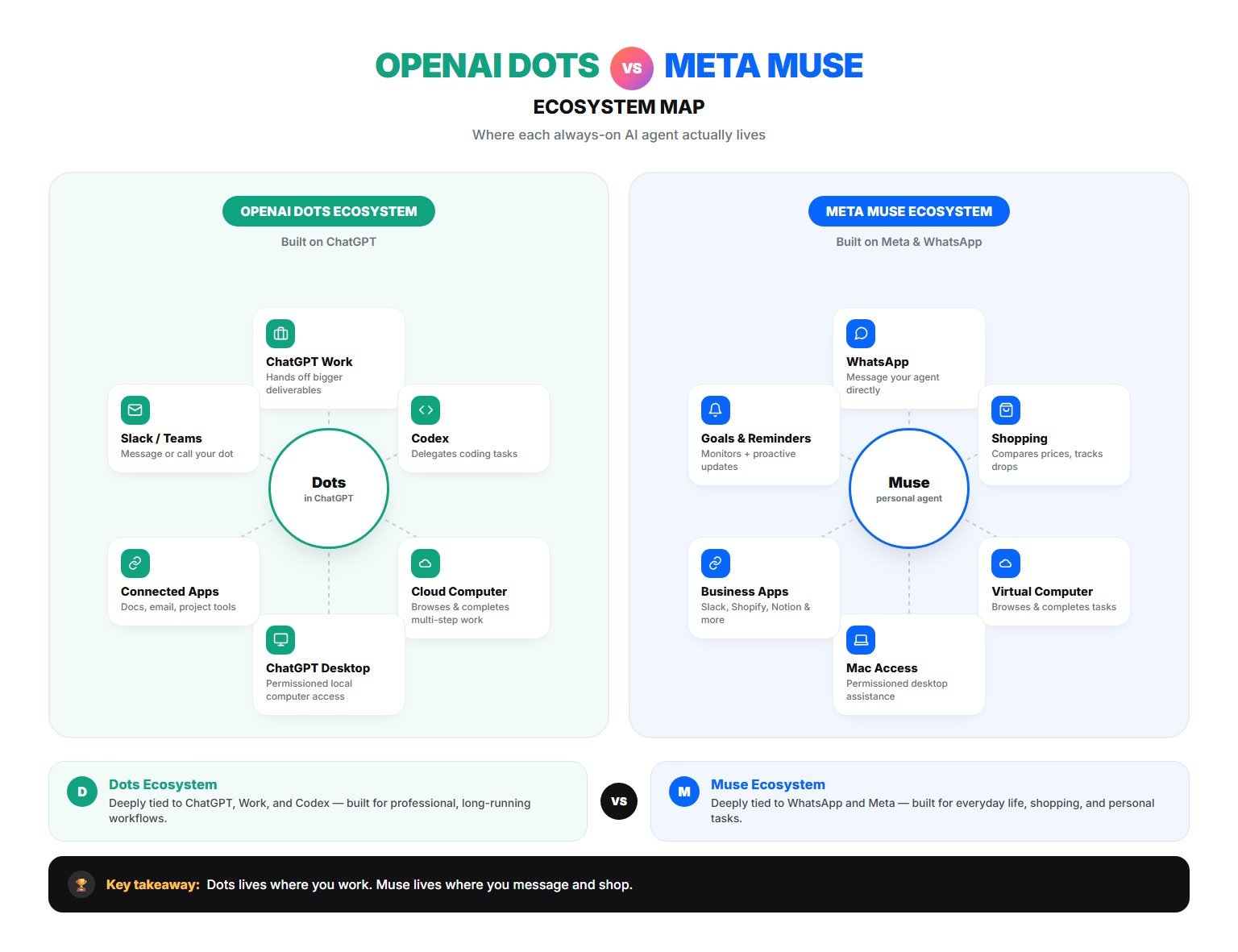
Before getting into the differences, it helps to see where each agent plugs in. Dots radiates out from ChatGPT itself; Muse radiates out from WhatsApp and Meta's own apps.
Dots vs Muse: The Real Differences
The capabilities overlap heavily, but several differences stand out.
Ecosystem
Dots is deeply integrated with ChatGPT and OpenAI's growing agent ecosystem. Muse is deeply connected to Meta, WhatsApp, and Meta's consumer and business platforms.
Price
Muse is much easier to try because it has a free tier and a $20 paid tier. Dots currently require higher-end ChatGPT access.
How You Communicate With It
Dots feels like an extension of ChatGPT. Muse is designed to feel more like messaging a personal assistant and can be accessed through WhatsApp.
Professional Workflows
Dots has a natural advantage for people already using ChatGPT Work and Codex. Its ability to coordinate with OpenAI's work and coding agents makes it especially relevant for knowledge workers, developers, and teams.
Personal and Commerce Workflows
Muse is placing more emphasis on everyday life, shopping, price tracking, purchases, returns, reminders, and personal goals. That doesn't mean Dots can't handle personal tasks — it reflects where Meta is currently putting more product emphasis.
Dots vs Muse: Which One Should You Choose?
There is no dramatic capability gap between the two. They're both trying to solve a similar problem: how do you turn AI from something that waits for prompts into something that can take ongoing responsibility?
Choose Dots if your digital life already revolves around ChatGPT and you want a persistent agent that connects naturally with OpenAI's work, research, and coding ecosystem.
Choose Muse if you want a lower-cost personal agent, prefer WhatsApp and Meta services, or mainly want help with everyday tasks, shopping, goals, reminders, and life administration.
For many people, the biggest deciding factor will simply be which ecosystem they already use.
Frequently Asked Questions
Are Dots and Muse basically the same thing?
They solve many of the same problems. Both are persistent AI agents that can browse the web, use computers, connect to apps, complete multi-step work, and proactively update you. Their biggest differences are ecosystem, pricing, integrations, and product design.
Can Dots work while I am offline?
Yes. Dots can continue supported work using their cloud computer between conversations.
Can Muse work when the app is closed?
Yes. Meta describes Muse as capable of continuing work in the background and returning with updates.
Can Dots or Muse make purchases?
Both can support workflows that involve external actions. Sensitive actions such as purchases can require user approval.
Is Muse free?
Muse currently offers a limited free tier.
Is Dots free?
Dots is included with eligible paid ChatGPT plans rather than offered as a standalone free product.
Can either one plan an entire trip?
Both are designed for multi-step workflows and can help research and coordinate travel. Actual booking completion can depend on the website, account access, availability, permissions, and required approvals.
Which one is better for creators?
Dots may feel more natural for creators who already use ChatGPT for research, scripting, documents, coding, and connected workflows. Muse may be attractive to creators who work heavily through Meta platforms, WhatsApp, Instagram, and Meta's business ecosystem.
Final Thoughts
Muse and Dots are a preview of what the next phase of consumer AI will look like. The first generation of AI assistants waited for you to ask questions. The next generation is designed to remember what you're trying to accomplish, keep working toward it, use software on your behalf, and come back when something needs your attention.
Muse currently has the easier entry point. Dots has the advantage of being deeply integrated into the broader ChatGPT ecosystem. But the bigger story is that Meta and OpenAI are both racing toward the same destination: an AI agent that can take ongoing responsibilities off your plate instead of simply answering prompts.
Source Notes
This article was prepared using product information available as of September 30, 2026.
- OpenAI ChatGPT release notes — help.openai.com
- OpenAI Dots getting started guide — help.openai.com
- OpenAI, “Introducing dots” (Sept 29, 2026) — openai.com
- OpenAI GPT-6 Astra auto-review safety documentation — deploymentsafety.openai.com
- Meta Muse product page — ai.meta.com/muse
- Meta Muse shopping page — ai.meta.com/muse/shopping
- Kingy AI comparison article, used as a research reference — kingy.ai
Pricing, availability, and usage limits can change during rollout. Verify current plan details before relying on this article if it's not been updated recently.